Newsletter Subscribe
Enter your email address below and subscribe to our newsletter

 ByJohn A
Everything covered in one place: the concept, the mechanics, the use cases, and the questions people ask most.
Somewhere between “never heard of it” and “uses it for everything,” most internet users eventually land on some version of a temporary email address once enough sign-up forms have piled up in their real inbox. This guide covers the concept from the ground up — what it actually is, how the message gets delivered, where it fits into everyday browsing, and the questions that come up most often once someone decides to try it.
A temporary email address is an inbox created for short-term use. It behaves like a normal email account for the purpose of receiving messages, but it isn’t tied to a real name, a phone number, or any lasting identity, and it disappears on its own after a period of inactivity. It goes by several other names — disposable email, temp mail, burner email, throwaway inbox — but they all describe the exact same underlying idea: a mailbox that exists only long enough to receive one specific message.
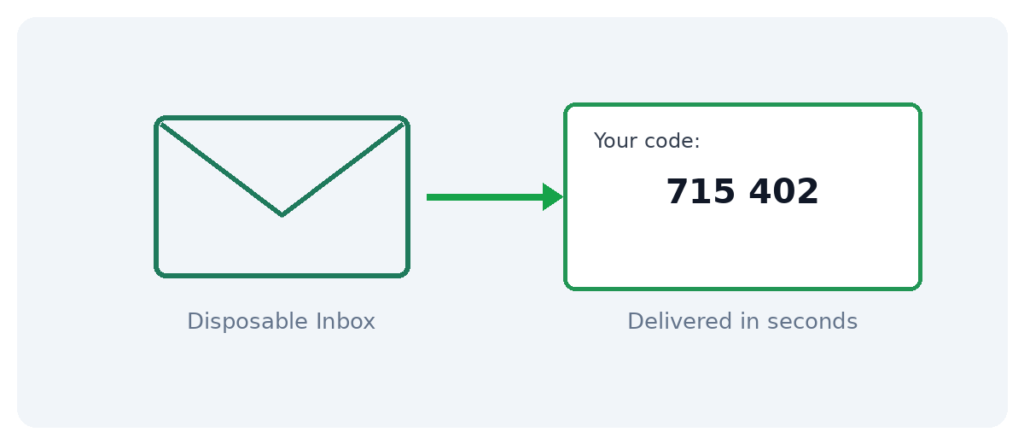
Behind the scenes, a provider like Loska Mailbox maintains a pool of available domains and generates a fresh address on demand, the moment it’s requested. That address is capable of receiving mail exactly like any other inbox — confirmation links, OTP codes, welcome messages — and routes each incoming message to a private dashboard in real time, usually within seconds of being sent. Once the address goes unused for a while, it expires, and everything inside it is deleted permanently.
A temporary address should never be used for anything that needs to last. Banking, employer accounts, subscriptions with recurring billing, and anything requiring password recovery down the line all need a real, permanent inbox — because once a temporary address expires, there’s no way to recover access to whatever was sent there.
The general rule: if losing that message tomorrow would cause a real problem, a temporary inbox is the wrong choice.
See Also: 7 Quick Fixes That Actually Work for HP printer offline
| Method | Tied to Identity? | Cost | Best For | |
| Temporary email | No | From roughly $0.01 per inbox | One-time sign-ups, trials, downloads | |
| Email alias | Yes, routes to real inbox | Usually free | Organizing ongoing mail | |
| Virtual number | No | From roughly $0.05 per SMS | SMS-based OTP verification | |
| Real primary email | Fully | Free | Banking, work, long-term accounts |
For sign-up forms asking for both an email and a phone number, pairing a temporary email address with a virtual number covers both requirements without either one tracing back to a real identity.
Yes — using a disposable email to sign up for something is legal in essentially every jurisdiction and doesn’t violate typical platform terms on its own. The distinction that matters is intent: privacy and spam avoidance are normal, ordinary reasons to use one, while using it to repeatedly abuse a one-per-customer offer or evade a ban crosses into misuse that no legitimate provider condones. It’s also worth knowing that many disposable inboxes are technically public — viewable by anyone who knows or guesses the address — which makes them unsuitable for anything genuinely sensitive.
What exactly is a temporary email address?
An inbox created for short-term use, capable of receiving messages like any normal account, without being tied to a real identity, and set to expire automatically after a period of inactivity.
How much does it typically cost?
Pricing usually starts around a cent per inbox, paid per use rather than through a subscription.
How long does an inbox stay active?
This varies by provider, but most stay active while being used and expire automatically after a period of inactivity, often within a day.
Can a temporary email send messages, or only receive them?
Only receive, by design — this keeps the service free of outgoing spam and is sufficient for verification links and codes.
What happens if a website blocks the domain I’m using?
Switching to a different available domain from the same provider and generating a new address usually resolves it within seconds.
Can the same address be reused after it expires?
No — once expired, it’s gone permanently. A fresh address needs to be generated for any future use.
Is there an API for generating disposable inboxes automatically?
Yes, a developer API allows programmatic generation and reading of inboxes, useful for automated testing or bulk sign-up workflows.
Should it ever be used for a Gmail or major platform account itself?
A temporary email works well as the receiving address for a one-time confirmation, but it isn’t suited to serve as the primary address for an account meant to persist, since those typically require ongoing ownership verification.
What’s the difference between this and a regular email alias?
An alias still routes back to a real, permanent inbox. A temporary address is a fully separate inbox that expires entirely on its own.
Is it worth using for every single online sign-up?
For anything not meant to last — yes. For accounts genuinely intended to be kept long-term, a real address remains the better and safer option.
Disposable email services have existed in some form for well over a decade, originally as a niche tool used mostly by forum regulars and early privacy advocates. What changed is the surrounding environment: sign-up walls became far more common across ordinary websites, data breaches went from rare news events to a near-weekly occurrence, and providers solved the early reliability problems — chiefly, popular domains getting blacklisted — by offering multiple domains side by side. Combined, these shifts moved the tool from a niche trick to something closer to a mainstream default for anyone paying even minor attention to inbox hygiene.
Not all temporary email services are built the same, and a few practical factors separate a genuinely useful one from a frustrating one. Multiple available domains matter most, since a single-domain service becomes useless the moment that one domain gets blocked somewhere. Delivery speed matters almost as much — a service that takes minutes to route an incoming message defeats the purpose when a verification code is needed immediately. Beyond that, whether the provider offers a developer API is worth checking for anyone who might eventually want to automate sign-ups or testing, even if that’s not an immediate need.
Once the basic mechanics click, a temporary email address stops feeling like a technical trick and starts feeling like common sense: a real inbox for what matters, a disposable one for everything that doesn’t. It costs almost nothing, takes seconds to use, and quietly prevents an enormous share of the spam and clutter that would otherwise accumulate one sign-up at a time. For anyone who hasn’t tried it yet, the learning curve amounts to about the length of this guide — after that, it’s simply a habit.
None of this requires technical expertise or a significant time investment — just a small shift in which inbox gets handed out by default, and a noticeable improvement in how clean the real one stays over time.