
Using Instagram on Huawei smartphones is effortless in 2026. Despite ongoing restrictions on Google Mobile Services (GMS), Huawei users around the globe can still enjoy the world’s favorite photo and video-sharing platform through a simple, reliable workaround. Setting up huawei instagram access is now completely seamless thanks to Huawei’s official AppGallery and the GBox utility. This 2026 step-by-step guide walks you through installing, optimizing, and enjoying Instagram on your Huawei device so you can scroll your main feed, post Stories, watch and create Reels, explore trending content, and chat via Direct Messages (DMs) without any hassle.
Is GBox Safe for Downloading Instagram on Huawei?
GBox Verification and User Experience Benefits
Users of Huawei devices can rest assured that downloading and running GBox, a globally recognized compatibility tool, is entirely secure after undergoing extensive testing and verification. When Instagram relies on Google Services for specific components like push notifications or location tagging, you can run it smoothly inside GBox, which is available directly via AppGallery and has passed rigorous security audits. Not only does GBox make huawei instagram easier to access, but it also delivers responsive speed and full functionality—logging in, refreshing your feed, uploading high-resolution Stories, applying AR filters, and watching Reels all work right out of the box. The seamless integration of GBox with AppGallery highlights Huawei’s ongoing commitment to offering users a safe and convenient way to enjoy popular global apps in 2026.
How GBox Simplifies Access to Popular Apps
With GBox, running international applications on Huawei smartphones is a breeze. Once you download and configure GBox during your initial setup, you can access other popular global apps without repeatedly installing extra software plugins. GBox acts as a smart compatibility bridge, preventing software conflicts and ensuring the smooth operation of visual-heavy apps like Instagram. By removing the barriers caused by the absence of Google Services, GBox opens up a broader app ecosystem—making it a dependable and effective solution that elevates your overall Huawei smartphone photography and social media experience.
Step-by-Step Guide to Installing Instagram on Huawei Phones
Accessing AppGallery and Searching for Instagram
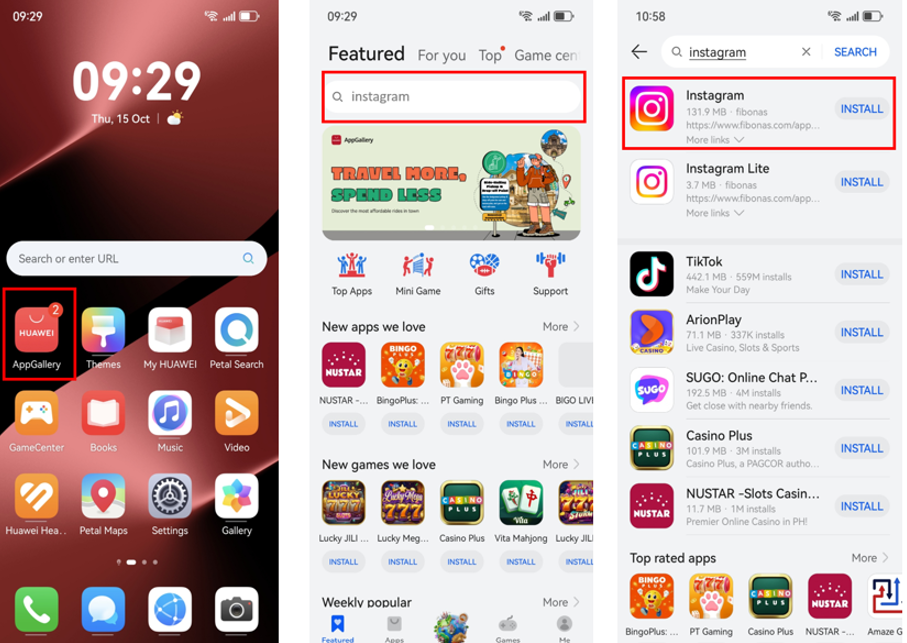
Opening AppGallery, the official app store pre-installed on every Huawei smartphone, is your first step. Tap the AppGallery icon on your home screen, head to the search bar at the top of the page, and type in “Instagram.” Tap the official search result to open the app’s landing page. Depending on your device model and region in 2026, a direct installation option may appear immediately. If it does, you can proceed straight away; if not, simply follow the on-screen prompts to install GBox so that huawei instagram can run seamlessly through that environment instead.
Installing GBox for Seamless Instagram Usage
Apps like Instagram operate effortlessly on Huawei handsets with the help of GBox. Tapping to install Instagram will guide you to a prompt where you can download GBox. Simply tap the “Install” button when asked to begin the download. Once completed, GBox works quietly in the background to support Instagram and other applications requiring Google Services. In addition to enhancing stability, installing apps via AppGallery alongside GBox saves time and effort without sacrificing reliability.
Launching and Logging into Instagram
Once both Instagram and GBox are installed on your Huawei phone, their icons will appear on your home screen. Tap the Instagram icon to launch the app for the first time, sign in with your account credentials, and start exploring. Every core feature works without a hitch: scrolling the main feed, posting interactive Stories, editing Reels with audio tracks, browsing the Explore tab, and messaging friends through Direct Messages. Thanks to GBox, huawei instagram runs so smoothly that you will not notice any difference compared to other smartphones. All it takes to get started in 2026 is a few easy steps.
See also: Understanding Health Insurance Options for Greater Financial Protection
Optimizing Your Instagram Experience on Huawei
Once Instagram is up and running, a few small adjustments can make your daily experience even more reliable on your Huawei handset. Keep GBox updated through AppGallery so that the latest 2026 compatibility patches are applied automatically. If Direct Message notifications are delayed, check your phone’s battery settings to ensure battery optimization is not restricting GBox in the background. Additionally, to make the most of your Huawei phone’s camera when posting Stories or Reels, enable “Upload at highest quality” under Data Usage and Media Quality inside Instagram’s settings. While these steps are optional, they ensure that huawei instagram remains fast, sharp, and dependable over time.